[Spring MVC] API 계층 (Prac Project - 2. ResponseEntity, Header)
by mignon25JSON 문자열로의 수작업 변환 코드 개선하기
package com.codestates.member;

import org.springframework.http.HttpStatus;
import org.springframework.http.MediaType;
import org.springframework.http.ResponseEntity;
import org.springframework.web.bind.annotation.*;

import java.util.HashMap;
import java.util.Map;

@RestController
//@RequestMapping(value = "/v1/members", produces = {MediaType.APPLICATION_JSON_VALUE})
@RequestMapping(value = "/v1/members")
public class MemberController {

    @PostMapping
    public ResponseEntity postMember(
            @RequestParam("email") String email,
            @RequestParam("name") String name,
            @RequestParam("phone") String phone
    ) {

        System.out.println("email = " + email);
        System.out.println("name = " + name);
        System.out.println("phone = " + phone);

        /*
        // JSON 문자열로의 수작업 변환 코드
        String response = "{" +
                "\"email\":\"" + email + "\"," +
                "\"name\":\"" + name + "\"," +
                "\"phone\":\"" + phone + "\"" +
                "}";
        return response;
        */

        // JSON 변환 -> Map 객체로 대체
        Map<String, String> map = new HashMap<>();
        map.put("email", email);
        map.put("name", name);
        map.put("phone", phone);

        // 리턴 값을 ResponseEntity 객체로 변경
        return new ResponseEntity<>(map, HttpStatus.CREATED);

    }

    @GetMapping("/{member-id}")
    public ResponseEntity getMember(@PathVariable("member-id") long memberId) {
        System.out.println("memberId = " + memberId);

        // not implementation

        // 리턴 값을 ResponseEntity 객체로 변경
        return new ResponseEntity<>(HttpStatus.OK);
    }

    @GetMapping
    public ResponseEntity getMembers() {
        System.out.println("MemberController.getMembers");

        // not implementation

        // 리턴 값을 ResponseEntity 객체로 변경
        return new ResponseEntity<>(HttpStatus.OK);
    }

}- 클래스 레벨의 @RequestMapping 의 ‘produces’ 속성 삭제
- JSON 문자열을 개발자가 직접 수작업으로 작성하던 부분이 Map 객체로 대체
- Map 객체를 리턴하게 되면 내부에서 JSON 형식으로 자동 변환해준다.
- 그래서 1번이 가능!
- 리턴 값으로 JSON 문자열을 리턴하지 않고 ResponseEntity 객체
- 생성자 파라미터를 통해 응답 데이터(map)뿐 아니라 HTTP 응답 상태를 함께 명시적으로 전달할 수 있다.
- HTTP Status 종류
실무에서 사용하는 대표적인 HTTP 헤더 예시
- Authorization
- 클라이언트가 적절한 자격 증명을 가지고 있는지 확인하기 위한 정보
- User-Agent
- 클라이언트의 유형 정보
HTTP Request Header 정보 얻기
1. @RequestHeader 로 개별 헤더 정보 받기
    @PostMapping
    public ResponseEntity postCoffee(
            @RequestHeader("user-agent") String userAgent, // 1
            @RequestParam("engName") String engName,
            @RequestParam("korName") String korName,
            @RequestParam("price") int price
    ) {
        System.out.println("userAgent = " + userAgent);


        Map<String, String> map = new HashMap<>();
        map.put("engName", engName);
        map.put("korName", korName);
        map.put("price", String.valueOf(price));

        return new ResponseEntity<>(map, HttpStatus.CREATED);
    }

    // 출력 결과
    userAgent = PostmanRuntime/7.31.3
2. @RequestHeader 로 전체 헤더 정보 받기
- 필요한 헤더 정보가 여러개일 경우, 일일이 추가하기 번거롭고 코드 가독성도 떨어진다.
- 이런 경우 전체 헤더 정보를 Map으로 한번에 받아서 원하는 헤더 정보를 얻을 수 있다.
    @GetMapping("{coffee-id}")
    public ResponseEntity getCoffee(
            @RequestHeader Map<String, String> headers,
            @PathVariable("coffee-id") long coffeeId
    ) {
        System.out.println("coffeeId = " + coffeeId);

        for (Map.Entry<String, String> entry : headers.entrySet()) {
            System.out.println("key = " + entry.getKey() +
                    ", value = " + entry.getValue());
        }

        // not implementation

        return new ResponseEntity<>(HttpStatus.OK);
    }
// 출력결과
coffeeId = 1
key = user-agent, value = PostmanRuntime/7.31.3
key = accept, value = */*
key = cache-control, value = no-cache
key = postman-token, value = 604020fc-98a9-4b10-86a5-772f44d95060
key = host, value = localhost:8080
key = accept-encoding, value = gzip, deflate, br
key = connection, value = keep-alive
3. HttpServletRequest 객체로 헤더 정보 얻기
    @GetMapping
    public ResponseEntity getCoffees(HttpServletRequest httpServletRequest) {
        System.out.println("CoffeeController.getCoffees");

        System.out.println("httpServletRequest.getHeader(\"user-agent\") = " + httpServletRequest.getHeader("user-agent"));

        // not implementation

        return new ResponseEntity<>(HttpStatus.OK);
    }

    // 출력 결과
    httpServletRequest.getHeader("user-agent") = PostmanRuntime/7.31.3
4. HttpEntity 객체로 헤더 정보 얻기
    @GetMapping("/testHttpEntity")
    public ResponseEntity testHttpEntity(HttpEntity httpEntity) {

        for (Map.Entry<String, List<String>> entry : httpEntity.getHeaders().entrySet()) {
            System.out.println("key = " + entry.getKey() +
                    ", value = " + entry.getValue());
        }

        System.out.println("host = " + httpEntity.getHeaders().getHost());
        System.out.println("host = " + httpEntity.getHeaders().get("host"));
        return null;
    }
// 출력 결과 1
key = user-agent, value = [PostmanRuntime/7.31.3]
key = accept, value = [*/*]
key = cache-control, value = [no-cache]
key = postman-token, value = [b444e078-6fbe-4ee4-82d3-de8e5576af82]
key = host, value = [localhost:8080]
key = accept-encoding, value = [gzip, deflate, br]
key = connection, value = [keep-alive]
// 출력 결과 2
host = localhost:8080
host = [localhost:8080]
HTTP Response Header 정보 추가
1. HttpHeaders 이용한 커스텀 헤더 정보 추가
    @GetMapping("/addResponseHeader")
    public ResponseEntity addResponseHeader() {

        HttpHeaders headers = new HttpHeaders();
        headers.set("Client-Geo-Location", "Korea,Seoul");

        return new ResponseEntity<>(null, headers, HttpStatus.OK);

    }
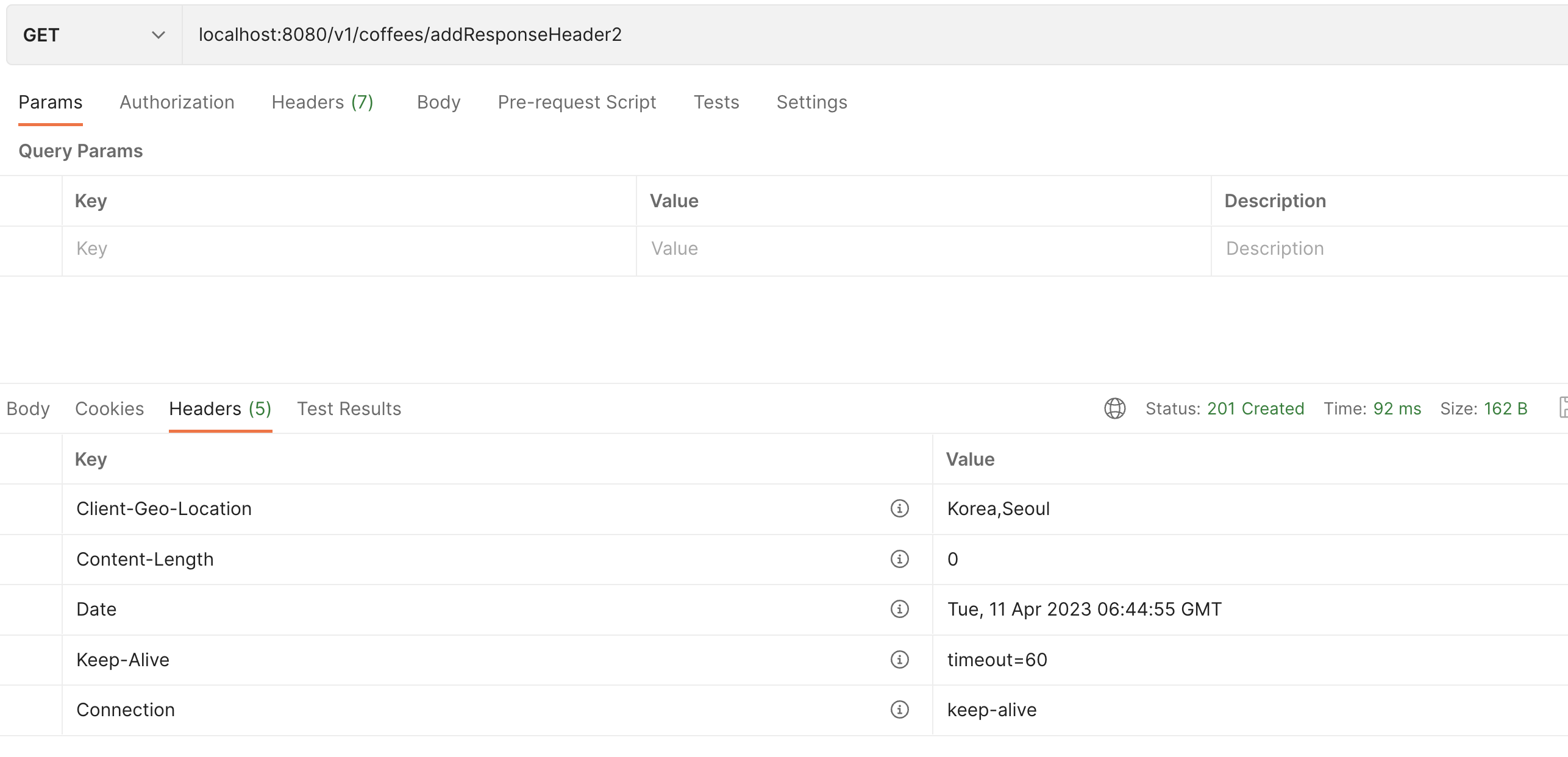
2. HttpServletResponse 객체로 헤더 정보 추가하기
    @GetMapping("/addResponseHeader2")
    public ResponseEntity addResponseHeader2(HttpServletResponse response) {

        response.addHeader("Client-Geo-Location", "Korea,Seoul");

        return null;
        // return new ResponseEntity(null,null, HttpStatus.CREATED); // 로 status 추가도 가능
    }
Practice Project - 커피 주문 애플리케이션
Additional Keywords
- ResponseEntity 더 알아보기
- HTTP Header 더 알아보기
- HttpServletRequest API Docs
- HttpServletResponse API Docs
- User Agent 유형
- 커스텀 헤더 사용 사례
'Spring' 카테고리의 다른 글
| Rest Client, RestTemplate (0) | 2023.04.17 |
|---|---|
| [Spring MVC] API 계층 적용하기 (Prac Project - 1. 커피 주문 애플리케이션 시작) (0) | 2023.04.16 |
| Spring MVC의 동작 방식과 구성 요소 (0) | 2023.04.14 |
| Spring MVC 란? (0) | 2023.04.14 |
| [빈 스코프] 빈 스코프와 프로토타입 스코프 (0) | 2023.04.13 |
블로그의 정보
Mignon'S Dev Log
mignon25